Showing posts with label Tutorials. Show all posts

Tuesday, May 21, 2019

12 Hidden Features to Control the iPhone Like a Pro

3:51 AM 0
This page discuss the 12 most important iPhone Hidden Features to help you control your Apple's iPhone like a pro in a very convenient way. Check out the list in details to uncover the latest iOS 12 hidden features to get the best out of an iPhone!

The iPhone in general, and iOS in particular, are full of small features. While some have long been known by the most seasoned users, others are much less notorious and still surprise the users as freshly landed.

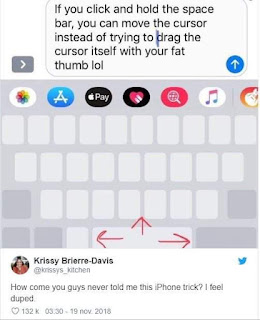
This is for example the case of the trick to move easily the text cursor by holding a finger on the keyboard. This "discovery", shared on Twitter by a food blogger last November, has been retweeted over 50,000 times and liked over 133 times.

To no longer miss a feature that could change your use of the iPhone, we reviewed 30 more or less iOS hidden features that we believe deserve to be known to many.


Also Read: Gaming Monitor For PS4 Monitor Beasts

1. Turn the keyboard into a trackpad

This trick is far from new. It exists since the release of the iPhone 6s, in 2015, and offers the possibility on all devices with 3D Touch, to move the cursor in a text by turning the keyboard of iOS trackpad.

To use it, tap and hold anywhere on the keyboard. The keys disappear and just hold the click of the 3D Touch and slide your finger on the screen to move the cursor.

Apple has decided to integrate this feature on all devices compatible with iOS 12, even those without the 3D Touch technology, as is particularly the case on the iPhone Xr.

To turn the iOS keyboard into a trackpad on devices without 3D Touch, tap and hold the spacebar and drag to move the cursor.

2. Go back to the top of a page quickly

You are used to browsing very long web pages? Rather than hastily scrolling all the content back to the top of the page, simply touch the status bar (where the network, time, and battery level are displayed) to instantly return to the beginning.

3. Quickly select multiple files in Photos

Quickly sharing all the pictures of the last family party with your loved ones can quickly turn into a nightmare.

Rather than selecting one by one all the images to share, you can make a multiple selection by holding your finger on the first image, then dragging it to the last one. You should be able to select at one time an entire group of photos.

4. Select multiple applications to store in a single folder

Do not let the bazaar settle on the screen of your iPhone. To avoid having to store your applications one by one in folders, it is possible to select several at the same time to drag them directly into a folder.

Tap an app's icon to make it shake and move it slightly while holding your finger on it. With another finger, tap all the icons of the apps you want to group except the last. Drag the selected application group to the last one to generate a folder.


5. Activate the one-handed keyboard

With the increased size of the iPhone screens, small hands can sometimes find themselves in an uncomfortable situation to grab text. However, it is possible to adjust the size and position of the keyboard according to the hand in which you hold your phone.

From the iOS keyboard, tap and hold the emojis icon or the world map, and in the options shown, select the left or right keyboard icon as needed. The keyboard should be tighter on the chosen side to make it easier to enter text in the hand where you hold your iPhone.


6. Add an attachment from an email

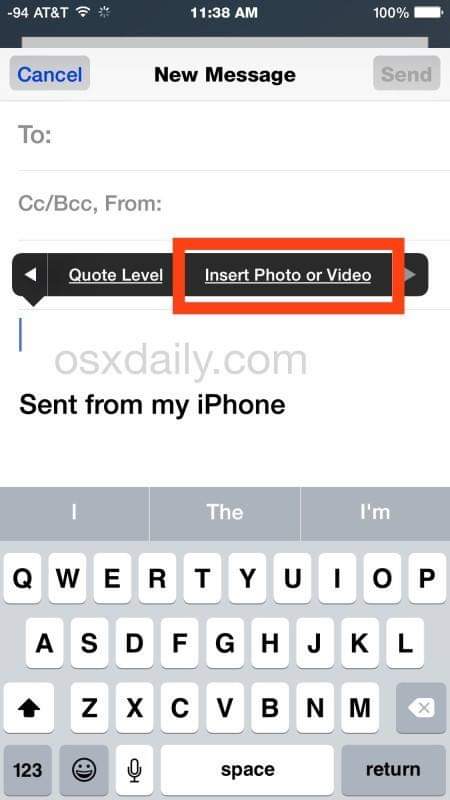
If it is possible to share photos and videos from the film by email, it is also possible to insert an attachment (photo, video, and document) directly from the window of writing a message.

To do this, from the body of your mail, tap the text box to bring up the options balloon: you can choose to insert a photo or a video, but also a document or a drawing by tapping on the arrow for scroll through the following options.


7. Turn on 4K video recording

Did you know that your iPhone was able to record video in 4K? By default, the video recording is set to 1080p 30 fps, less consuming in storage. However, since the iPhone 6s, it is possible to capture videos in 4K with the camera of the device.

To turn it on, open iPhone Settings, go to Camera, and then select Video Format.


8. Schedule a timer for music

Falling asleep to the sound of your favorite playlist is not impossible. You can easily program the extinction of the music application after a set time.

To do this, start playing your music and open the Clock app (or access it from the control center). Enter Ringtone, then scroll through all options to select the last one, Stop Music. Confirm by pressing Select and specify the length of time after which you want to stop the music. Start the timer by pressing Start.

9. Create a personalized vibration for calls

Even if your iPhone is in your pocket, there is a way to easily identify who is trying to reach you. IOS offers the ability to generate custom vibrations that can be assigned to defined contacts.

Open the Settings, enter Sounds and Vibration, and enter the type of alert you want to create, in our case, Ringtone. Then go to the Vibration menu and tap Create Vibration. Tap the screen according to the vibration rhythm you want for your sequence. Validate it by pressing Stop and then save and give it a name.

To assign your custom vibration to a defined contact, open the contact card, tap Edit, then in the Ringtone menu, enter Vibration and select your custom vibration. This custom vibration sequence will be used whenever your caller calls when your iPhone is in vibrate mode.

10. Erase a number and enjoy a scientific calculator

Here again the trick is (very) old, but will serve newcomers. An error has crept into the numbers you entered on the calculator? Rather than erase everything to start again, it is possible to erase the last digit (s) typed simply by sliding your finger on the display.

And if you had to do a complex calculation, you can still take advantage of scientific calculator mode by switching your iPhone to landscape mode.

11. Check the date and time of sending a message

Do you remember the date and time when you sent an SMS? Open a conversation in Messages, tap and hold the conversation and drag it slightly to the left. You should see the time of each message in the conversation.

12. Disable the Keyboard App Bar

If you are among those who do not use, or very few (just to send pictures?) The application bar of the Messages application, there is a very simple way to disable its display in a conversation.

Tap and hold the App Store icon to make it disappear. You can find it by pressing this button again.

The above list are some important iPhone Hidden Features which I think might be useful to all Apple's iPhone users. I hope you enjoy my IPhone hacks…! Send you feedback in the below comment section.

Tuesday, January 29, 2019

5 Tips to Make an Amazing Logo in 2019

1:29 AM 2
Logo design trends

Logos are used for different purposes like branding, marketing, brand identification, differentiation, and such others. However, it could be said that only the logos that are effective and amazing have the tendency to get these purposes to be achieved. Thus, not only making a logo is important but making it with the best elements is important and here are some of the tips that you can contemplate upon to make the best logo design.

How to Design an Amazing Logo for Your Company?

Here are 5 easier way to make an awesome logo like pro:

1. Make it rememberable

The best logo design is the one that makes an impact in the minds of the people. The more logo design should be remembered able in terms of making the people associate it with the brand and whenever they see something similar they should get back to the logo that you have made.

2. Make it timeless

Trends are to be followed in the logo when you are making it for some campaign for a shorter period of time. However, if you want to make the contemplations on making the logo to be made for the longer term which is the purpose of most of the logos then you need to make the logo timeless. The logo should not have anything with respect to the trends or things that are temporary.

3. Use clever colors

Colors are said to be the first impression of a logo and this is the reason that while selecting the colors you should consider a number of things. The first thing is that your color should reflect upon your brand and should make the contemplations on the picking the sober colors that also suits the brand you have.

4. Be different and avoid being cliché

Being similar to everybody makes you be lost and go unnoticed when you are in the industry of logo designing and thus you should make the progressions on making it different. The things that you use in the logo should be out of the box and they should be something that everyone likes to see as well as achieves the purposes that are attached to it.

5. Keep it simple

Simplicity is what makes things to be understandable and this has thus become an important element of the logos. When you increase the complexity it makes the logo to become hard to understand making some of the purpose of the logo to be lost. Thus, keeping it simple is another important thing that you should look for in order to make an amazing logo.

 These are some of the important tips that you can contemplate upon in order to get the best logo design to be made.

The logo when is complex or is having some bad colors it might go unnoticed or even if it is in something cliché it could make the logo to lose its worth and thus if you want to make it be impactful on your target audience then you should go for the tips that have been stated above and this way you can achieve the purposes that you have attached with the logos. Happy designning!

Friday, January 25, 2019

Showbox For Android: Download the Latest Version to Watch Free Online Movies, TV shows and Series On Your Android

12:34 PM 0
Searching for how to download Showbox on Android? Stop the search! Learn here how you can easily download/install Showbox APK (Latest Version) fast on your Android device and enjoy the free online movies,  TV series and shows directly on your Android with less effort.

But before I dive into giving you the steps, let's get to know what Showbox for Android is all about. Showbox for Android is one of the most popular Android app that lets you discover fantastic movies and enjoy unlimited free movies and TV shows directly on your Android. Not only can you stream episodes directly from the app, but you can also download your favourites to your device's memory and watch them offline anytime and anywhere.

Showbox for Android is free to download and was built with the movie lovers in mind to watch movies and TV shows for free.

Take note: There are many articles and YouTube videos teaching “How To Download LATEST ShowBox On Android” but here I come with something new and it's the simplest one among other tricks to download Showbox Apk on Android device.

In this article, we shall be showing you how to download Showbox for Android fast without redirecting from one page to another, just a simple click and the app would be installed.

Note: If you are thinking of installing it from Google Play Store, sorry. Showbox for Android is not yet available in Google Play but don't worry, at the end of this article I will share a 100% working link to download Showbox App for Android (latest version).

Showbox-Apk-for-Android

Now Let's get started

How To Download ShowBox Apk On Android


1. You have to visit: https://show-box.one/,

Showbox App for Android Download

2. Click on “Download For Android” after that you will be redirected to https://show-box.one/showbox-apk/, scroll down till you see “Download ShowBox APK 5.10” and finally you are in Showbox Apk download homepage with welcoming messages.


3. Click on download Showbox and your downloading process should start immediately. You can use any browser on your Android, either Chrome, Firefox, or the UC Browser app. To me, I prefer using the UC mini for faster download experience.


Now you have successfully installed the Showbox apk on your Android, the next step is how to use the app. Don't know how to use Showbox for Android? Relax and follow the procedure below.

How to Download Showbox on Android (Easy Steps)


Showbox App is free to download, yet it's an app designed for all Movies Lover with a clean user interface which allows streaming of best TV shows and series. This app is a very simple to use but if you are new to it then read below steps on how to download Showbox for Android quickly.

Step 1, Download the latest showbox app from the above-given link.

Step 2, Turn on “Unknown Sources” on your Android device from the settings menu to install the Showbox Apk on your android device. E.g. To turn on the unknown sources option simply go to your phone settings ==>> Security ==>> Turn on “Unknown Sources”.

Note: This step may vary for different devices depending on the android operating system.

Now you can open the downloaded latest showbox apk file to install the app on your Android device.

When the installation process is successful you can easily use the app to access unlimited movies, TV shows, series and also free music streaming on your Android device.

Furthermore, in Showbox app, you don't have a need to download any other video or mp4 player. In this application, you need to just click your favorite Movie and then you'll enjoy All videos.

The Showbox apk is less in size and easy to download and install for all android users.

Show Box Apk File Details (Official)


• File type: Showmax .apk
• File Size: 39.1 MB
• Requires Android Version: 4.0 or above
• Download Time: 10 Seconds
• Video quality: HD 720 Pixels
• Features: Light, Genuine, Unlimited movies streaming
•Mods available: Yes

You can easily download the latest Showbox apk from the given link below, just tap on the Direct Download Link of Showbox Apk 2018 Latest Version below.


Back-end team of ShowBox ensures a great user experience by curating the content and ensuring the latest collection of popular movies. You will also get automatic app push updates, Just download this Free Movies streaming app and get a great experience with this wonderful Application.

Wednesday, January 23, 2019

How To Download Toxicwap TV Series and Movies On Android, iOS & PC

3:36 PM 0
Toxicwap TV Series: It's obvious that both Android and iOS users who love to download TV series and movies to their mobile devices often use Toxicwap because it's the best online downloading website. That's because Toxicwap.com is frequently updated with the latest trends around the movie industries. It's one of the perfect website to download venom completely. However, not everyone that visits Toxicwap knows how to download TV Series and movies to their mobile devices. Fortunately, there is a way to download Toxicwap TV Series fast and easily on Android and iOS devices.

Today, in this post, I’ll walk you through the very simple steps to download Toxicwap latest movies and Toxicwap TV Series in HD quality from best online downloading website. See details below.

How To Download ToxicWap Movies & Toxicwap TV Series in HD, MP4 or 3gp Videos [From A-Z categories and genres 2019]

First, visit www.toxicwap.com, click the movies or TV series section or perhaps category as per your choice, then find the movies you want to download. To search for your favorites on the toxic wap is very simple.

For instance, you are looking for the movie “Blindspot S04E04” to get started, all you need to do here is to click on the category of TV Series starting with the letter B, then you will have a list of all movie with the name starting from letter B.

If you don't see your favorite, simply use the pagination number (Next 1, 2, 3, 4, 5, 6,7) till you get all the movies or TV series you want to download to your mobile.

When you finally got your desired film then click it ==> select from the season you want. I will be using the Blindspot TV Series for illustration on how to download Toxicwap latest movies and TV series on mobile phones.


Download Toxicwap TV Series

See screenshot below:

Toxicwap Blindspot S04E04
As you can see in the screenshot I'm downloading Blindspot season 1 so I have to click on that and it would take me to the next step where you would be shown the list of movies in Blindspot season 1.

Screenshot:
Blindspot season 1

To download a movie choose the video episode that you’d like to download. Once you clicked it, you will be taken to movie download page. In the download page, scroll down and tick “I'm not a robot” for human verification then tap on the download button. The best part of downloading TV Series from Toxicwap.com is its fast, clean and safe browsing User IInterface ( UI).

Toxicwap latest movies download

How to Download Toxicwap TV Series, ToxicWap 2019 Movies in HD, MP4 or 3GP Videos Without Human Verification

If you don't want to waste your time with google human verification stuff on Toxicwap here is a good news for you! You can now download movies, TV series without verifying that you are human on www.toxicwap.com. How to do this? It's very simple, once you are on the download page, tab on the video to stream online, while the video is playing carefully look at the right down side, there you will see a download icon. See screenshot 👇:

Toxicwap-play-video-online

Then tap on the download button and the movie begins downloading to your device.

Toxicwap movies download
Now, the movie downloading is in progress...

Final Thought On Toxicwap TV Series Download

That’s it. You’re ready to watch, download and take all your favorite Toxicwap TV Series and movies with you. Just visit Toxicwap.com, follow the above-discussed process and Enjoy!

Note: If you face any difficulty downloading on your Android device, simply hold your finger on the download button and select "save link", for problems downloading via PC/Laptop simply right click the download button and select "save target as".

Sunday, January 13, 2019

Bet9ja Old Mobile Coupon Checker - Learn How to Check Bet9ja Bet Slip Fast and Easily

10:59 AM 0
Bet9ja mobile coupon check

The Nigerian #1 betting site Bet9ja had recently changed the design and some layouts of their website and as a result of that upgrade, many users are finding it difficult to carry out some gambling activities such as coupon checking page and that brought about lots of users looking for bet9ja old mobile coupon checker as it's more specific and easy to use than that of bet9ja new mobile options.

So, if you are one of those guys that prefer using bet9ja old mobile coupon checker to the new bet9ja coupon checker then you have arrived at the right place to get a one-click link to access bet9ja old mobile coupon check page easily and fast when you place those high odds bet on bet9ja and you need to be able to regularly check your bet slips or bet tickets in order to monitor your games for any possible bet cashout!

This can also be done on bet9ja new mobile but it seems many people find it so difficult.

Maybe you are one of them, however, by using bet9ja old mobile coupon checker, you can look over games which you've booked during a specific period.
Also read: how to fund bet9ja account with ATM Card.
But hey! Mate... try and get used to the new bet9ja because “it's a new creature, the old things passed away; behold, new things have come!” 😂

How To Easily Access Old Mobile Bet9ja Coupon Checker

Here is how to easily access and use bet9ja old mobile coupon checker page to check your running bets and your bet history:

Step 1: visit old-mobile.bet9ja.com/Home.aspx

Bet9ja old mobile

Step 2: Click the Check Coupon Menu

Bet9ja old mobile coupon checker page

Old bet9ja mobile coupon checker.

Step 3: Type in Your Coupon Codes 

Here you will be provided with input-form which you will fill your coupon codes and hit “CHECK” button to see the outcome of your bets/games.

Bet9ja Old Mobile Coupon Check

Step 4: Click on Check

To do this, you need to enter your bet slip codes in the input field (B924SZCZTPRASC-3886202) as seen in the image below:

Old bet9ja mobile

After fill in your coupon codes and click on the check-in button.

Once you click on the CHECK button, this is how the old mobile bet9ja winning ticket page will look like on your mobile device:

Bet9ja old mobile Betslip Code

Bet9ja Old Mobile Coupon Checke: Final Thought

To all Bet9ja mobile users, this is how you can check your bet slip with bet9ja old coupon checker without sstressing yourself. After reading this post I believe you will no longer ask for how to use bet9ja coupon checker, how can I check check bet9ja coupon. We hope you had a wonderful time checking your winning bet slips on old mobile bet9ja!

Happy gambling!!!